
How To Check Telenor SIM Number | Top 4 Best Methods in 2026
Obviously, if you have landed on this article, it means that you have a Telenor SIM and you don’t know the number of this SIM; then, there’s Nothing to worry about. In today’s article, we will share some methods to find your Telenor SIM number.
We assure you that after reading this article, you will never face this problem. We will provide you with some codes and methods that can help you find your SIM number. You have to read this article completely.
How to Check Telnore SIM Number in 2026
There are many telecom companies in Pakistan, including networks like Telenor, Zong, U-Phone, Jazz, so if anyone’s service is used the most today, it is Telenor. Telenor is a network that is very popular.
We have shared with you some such methods by which you can find out your Telenor SIM number, and one thing I can tell you with certainty is that if you use these methods, you will never have to face this problem in your life.
There are several ways to verify the SIM number, including checking through the code, using the application, and contacting the helpline. In this way, we will share with you the most commonly used methods. Even if you don’t have a balance, you can use these methods to find out the number.
Article Key Points
- Check Telenor Sim Number By Franchises
- Check Telenor Sim Number Through Code
- Check Through the SMS
- Check Telnor Sim Number Using App
How to Check Telenor SIM Number through Code?

Guys, this method is very safe and easy to use for checking your Telenor SIM number. A lot of people know this method, but they do not know the real and working code for this. First, we tell you the truth about this method and then share it with you.
You are following the steps below. If you follow this method, pls confirm you have entered a SIM in your smartphone, then follow this.
- Open your mobile dialer pad
- Dial the Code ( *345*4007# ) and make a call
- Your code is running
Now it will happen that as soon as you dial this code ( *345*4007# ) that we have told you, it will be written in front of you that your request is being processed, then after a few seconds, your number will be told to you in your inbox that this is your number.
This is the method of finding your number. We have used it personally and have also shared some screenshots with you, which you can see above. Guys, if you live in Punjab, then you can apply for the CM Punjab’s Asan Karobar Card Scheme.
How To Check Telenor SIM Number Using SMS?
This is the method of finding out your number through a message. We have tried it many times with many people. What you have to do is send an SMS to the person you want to know. When you send that SMS, you will know your number. Let’s try to learn this method.
In this method, you have to send an SMS to the company’s helpline number, which is a four-digit number. You have to send an SMS to it, in which you don’t have to write anything; you have to send a blank SMS, but you will get the details in return.
- Open the messaging app on your mobile phone
- Type Blank SMS and type ( Info )
- Send this message to the 7421
- You receive a message with your number details.
This is a very useful method. If you understand it a little, you should definitely try it. It can be very useful for you.
How To Check a Number Via My Telenor App?
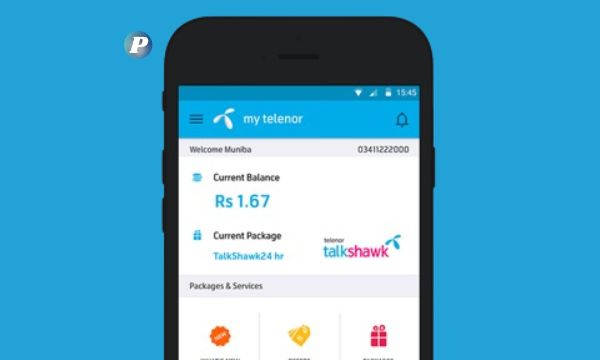
My Telenor app is the most used application in the telecom network. With the help of this application, users who use Telenor’s network also have information about their SIM and are also given information about which Telenor package bundle they have subscribed to.
We have explained this method in a little detail to explain it to you. Look, friends, in this application, you will be able to get information about your SIM only when you know your number, but how do you find out the number from it? We are going to tell you a method about it.
- Open your mobile phone’s Play Store or App Store.
- Search and download the Telenor app
- Click on the register option.
- They automatically enter your number and send an SMS to your inbox.
- You can enter this verification code and log in.
- Your Telenor SIM number appears on your home screen in this application.
This was how to find out your SIM number with the help of the My Telenor app. With the help of this application, you can also recharge the balance of your SIM and subscribe to any bundle for yourself, be it call minutes, internet package, or SMS package.
How To Check Telenor SIM Number Via Franchise
Let us tell you that there are Telenor offices in every city, which we call franchises in common language, where Telenor services are provided, such as how you can renew your SIM, or if you want to get any kind of Telenor-related help, you will get it from there. So let’s try to find out how we can find out our number with the help of this.
You have to go to their office with your ID card. There, you have to give them your ID card and say, “Tell me the number of the SIM card that is on this ID card number of mine.
If you have one SIM card or two SIM cards in your name, you will be given their numbers. This is a very easy method, but you will have to put in a little effort and time for this.
Many people ignore this method and think that it will not help, but this is a misconception. It can help you a lot, so be sure to use it.
Conclusion
In this article, we have told you more than one method with the help of which you can find out your Telenor SIM number. I have told you a total of four methods, out of which you can find out the number using any of them.
Whatever knowledge we have given you here, we have thoroughly checked it and delivered it to you. Our goal is to help you. We hope that you have found out your number using these methods. If you have any questions, you can comment. Thank you very much for reading this article.